Table of Contents

## Introduction to Over the Hill on PC

Tip

When diving into Over the Hill on PC, remember that this is a driving experience focused on mindful exploration rather than high-speed racing. Take your time navigating challenging biomes inspired by real-world locations.

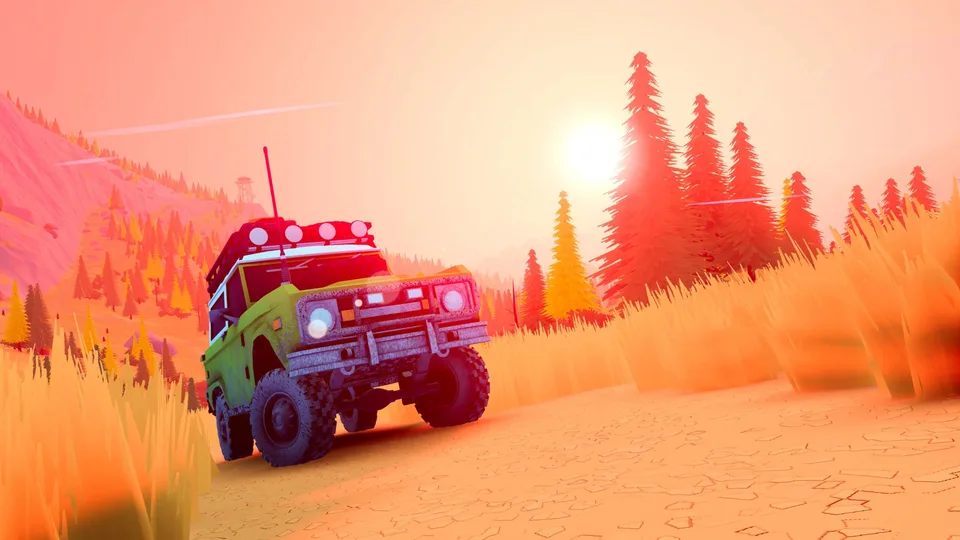
When exploring the vast wilderness of over the hill, players step into the newest installation from Funselektor Labs Inc., the creators of art of rally. Available on Steam, this title shifts away from traditional competitive racing toward a more immersive, chill driving journey. Whether you choose to tackle rugged landscapes by yourself or team up with friends in online co-op, understanding the core mechanics will help you master the winding trails and unpredictable weather.

## Exploring the Wilderness and Co-Op Mechanics

The core philosophy of over the hill centers on mindful navigation and group cooperation. According to community reports and hands-on player experiences during preview events, exploring remote maps requires careful coordination when driving iconic 4x4 vehicles from the 1960s to the 1980s.

  1. Route Planning: Use the map to place pins, spot cabins, natural landmarks, and hidden meteorites together with your convoy.
  2. Vehicle Recovery: Deploy portable winches to pull stuck teammates out of difficult mud pits or steep slopes.
  3. Environmental Adaptability: Utilize tools like wooden planks to cross gaps, and manage dynamic weather conditions that alter terrain grip and visibility.

Players often note that teamwork makes or breaks an expedition. If someone rolls their vehicle or gets trapped near a lake, attaching multiple winches or utilizing flip-recovery tools becomes essential for survival.

## Vehicle Customization and Progression

Upgrades and Equipment

Discover various roof racks, surfboards, spare wheels, and specialized tires across the map. These items improve tire grip, increase utility, and let you customize your vehicle's performance to match specific biomes.

Cosmetics and Personalization

Stop at merchants and remote cabins to apply custom colors, accessories, and unique cosmetic items such as amber beacons or fairy lights, ensuring your off-roader stands out on the trail.

Progression in over the hill relies heavily on discovery. Rather than grinding through repetitive circuits, you uncover upgrades naturally by exploring valleys, mountains, and dense forests. Community feedback highlights that finding hidden items and interacting with merchants adds a rewarding layer of depth to your cross-country travels.

## PC System Requirements and Performance

Before setting out on your off-road adventure, ensuring your PC meets the necessary hardware specifications guarantees a smooth journey through the dynamic biomes.

  • OS: Windows 10 (64-bit processor and operating system required)
  • Processor: Intel Core i5-7400 / AMD Ryzen 5 2600
  • Memory: 8 GB RAM
  • Graphics: Nvidia GTX 1070 / AMD Radeon RX 5600
  • DirectX: Version 11
  • Storage: 4 GB available space (tested on FullHD resolution)

These baseline specifications allow players to enjoy the game's charming art style and atmospheric nature simulation without performance drops, even when handling dynamic day-night cycles and weather changes.

## Frequently Asked Questions

Is Over the Hill a racing game?

No, the developers explicitly design over the hill as a driving and exploration game rather than a racer. Players are encouraged to take their time, find alternative routes, and enjoy the scenery.

Can I play Over the Hill with friends?

Yes, the game supports single-player mode as well as online co-op for up to four players, allowing you to explore trails and rescue each other using winches and recovery tools.

Where can I purchase or wishlist the game?

You can visit the official Steam Store Page to wishlist the game, view community hubs, and check for updates regarding release details.

Related Guides

In this category

Over the Hill Xbox PC Crossplay and Platform Features

Discover how over the hill by Funselektor Labs handles Xbox and PC crossplay, cross-platform co-op, and Xbox Play Anywhere features.

Continue reading
Related guide

Over the Hill Download Guide: PC Platforms and Official Links

Discover how to access Over the Hill on PC, explore its open-world off-road adventure features by Funselektor Labs Inc., and check out official download links.

Continue reading
Related guide

Over the Hill PC Release Date and Gameplay Overview

Discover the official PC release date for the off-road exploration game Over the Hill and learn about its unique driving mechanics and cooperative features.

Continue reading
Explore next

Over the Hill Max Graphics Requirements: PC Specs & Hardware Guide

Discover the system requirements for running Over the Hill at max graphics. Check CPU, GPU, and RAM specs to ensure your PC is ready for off-roading.

Continue reading

References