Over the Hill Multiplayer Demo: Hands-On Guide & First Impressions
Explore the co-op off-road gameplay of the Over the Hill demo. Learn about vehicle mechanics, exploration tips, and performance expectations for this upcoming title.
Published: over the hill Wiki Editorial Team
Table of Contents
Exploring the Over the Hill Demo
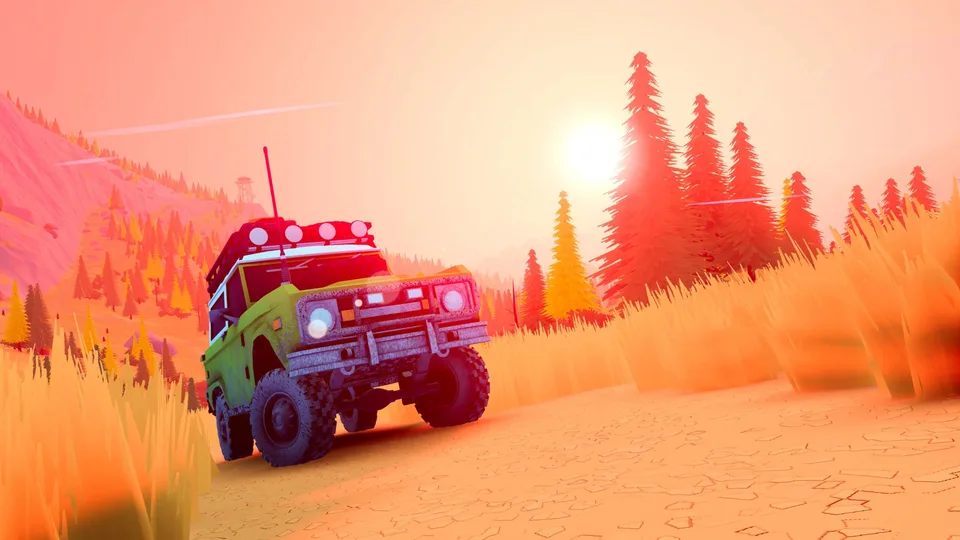
Over the Hill positions itself as a charming, co-op-centric off-road exploration experience. Unlike traditional racing games that focus on speed or circuit times, this title centers on the journey, teamwork, and the "golden age" of 4x4 vehicles from the 60s to the 80s. The demo, often featured during events like Steam Next Fest, provides a slice of the gameplay loop, allowing players to test the physics, weather systems, and cooperative tools before the full release.
If you are jumping into the demo, expect a slower, more deliberate pace. The objective isn't to blast through checkpoints but to traverse difficult landscapes, clear obstacles, and manage your vehicle’s condition alongside friends. Whether you are playing solo or with a group, the game emphasizes "exploring as a group," where helping a stuck teammate is just as important as driving your own path.
Understanding the Co-op Mechanics
The heart of Over the Hill lies in its cooperative tools. Navigating the wilderness requires more than just raw horsepower; it requires smart use of the equipment provided to your vehicle.
Portable Winch
The essential tool for getting unstuck. You can attach it to trees or other vehicles to pull yourself or your teammates out of deep mud, water, or difficult slopes.
Repair Kit
Essential for maintaining vehicle health. If you take damage from reckless driving or environmental hazards, you will need this to keep your engine running.
Camp Tools
Items like the campfire allow you to manipulate the environment, such as passing time to skip harsh weather or poor lighting conditions.
Radar & Jacks
Used for specific environmental interactions, such as locating meteorites or flipping your vehicle back upright if you happen to roll over.
Mastering the Winch System
Based on player reports, the winching system is intuitive but requires practice. You can attach multiple winches to a single object or vehicle, which is particularly useful when a teammate is heavily bogged down. A common mistake new players make is relying solely on the vehicle's engine power. If you find yourself sliding backward into a lake or stuck in a ditch, stop, deploy your winch, and coordinate with your team to pull the vehicle out.
Tip
Always use your parking brake when stopping to check the map or coordinate with your team. Failing to do so can lead to your vehicle rolling into your teammates, causing unnecessary damage and frustration during your exploration.
Vehicle Customization and Progression
While the demo offers a limited look at the full potential of Over the Hill, the customization options available are surprisingly deep for an early build. Players can equip various parts to their vehicles, which likely serve as the progression backbone of the full game.
Cosmetics and Functionality: You can equip items like roof racks, surfboards, and bull bars. Some items serve a functional purpose, such as improving grip with tire upgrades or adding utility with spare wheels.
Item Unlocks: During exploration, you may find crates or complete objectives that unlock new items for your character or vehicle. Note that in the current demo build, some unlocks may be local to the player, meaning you should communicate with your group to ensure everyone gets the gear they need.
Progression Motivation: The game encourages you to explore different areas, which often requires specific vehicle capabilities. As you unlock better parts and vehicles, you gain the ability to tackle terrain that was previously impassable.
Technical Performance and Handheld Experience
A common question for modern PC titles is how they handle on portable hardware. According to community testing, Over the Hill is quite scalable.
Handheld Performance: The game runs effectively on devices like the MSI Claw 8 AI Plus.
Upscaling: Activating FSR (FidelityFX Super Resolution) on the "Balanced" setting is recommended for maintaining smooth frame rates.
Settings: Medium quality settings at full HD resolution provide a good balance between visual fidelity and performance.
Visuals: Even on medium settings, the artistic direction remains clear, and the game maintains its "charming" aesthetic.
If you are playing on a traditional PC, you can expect higher fidelity, but the game is clearly optimized to be playable across a wide range of hardware, including mobile gaming PCs.
Frequently Asked Questions
Is there a single-player mode?
Yes. While the game is heavily focused on co-op, you can play alone. The game includes a tutorial that teaches you how to operate the camera and handle the vehicle, which serves as a good introduction to the mechanics.
What is the goal of the game?
The primary goal is exploration. You are tasked with driving through challenging trails, visiting locations, and managing your vehicle's condition. It is a "chill" game that rewards curiosity rather than pure speed.
Will there be more maps and vehicles?
The demo features the "Emerald Lake" map. While the developers have not spoiled the full list, the gameplay loop suggests that the full game will include a variety of maps, potentially including different biomes like snow, and a progression system involving new vehicles and parts.
Is the game "Steam Deck Verified"?
As of the current demo release, players are actively testing compatibility. While it runs well on handhelds like the MSI Claw, always check the official Steam store page for the most up-to-date compatibility badge.
Final Thoughts for New Players
The Over the Hill demo provides a solid foundation for what promises to be a relaxing yet challenging off-road experience. The key takeaway for new players is to embrace the slower pace. Do not treat this as a racing game; instead, treat it as a road trip simulator where the challenge is the terrain itself. Communicate with your team, use your tools effectively, and don't be afraid to take the scenic route.
For the latest updates on the full game's release date, pricing, and system requirements, keep an eye on the official Over the Hill Steam Store Page. The community is already active, and developer updates are frequently posted to the news hub, making it the best place to stay informed as the project moves toward its full launch.